If you want to build a production-grade voice agent, there are some things you will need: A way to connect phone networks. Speech-to-text processing. Understanding requests and executing actions. Text-to-speech output. Observability so it’s not a black box.
The hard part is not any single component. Managing voice streams, converting speech to text for processing, detecting when a user finishes speaking and expects a reply, converting text responses back to speech, and streaming it back is an entire discipline. The protocols needed to move all that data seamlessly with minimal latency so conversations feel natural get complicated fast.
So, how do we build this using AWS?
The obvious AWS approach would be replacing each box with a primitive. Amazon Transcribe for speech-to-text. Polly for text-to-speech. Bedrock with action groups and knowledge bases for tool use and retrieval.
But AWS launched something just after re:Invent that simplifies most of these steps: Nova 2 Sonic.
Speech-to-Speech Changes the Interaction Model
Nova 2 Sonic is built for one job: letting an application have a natural, real-time voice conversation where the input is audio and the output is audio. AWS describes it as a speech-to-speech foundation model that “unifies speech understanding and generation into a single model” for conversational AI.
Picture how a traditional pipeline behaves. You record audio, send it to a speech-to-text service, wait for a transcript, send that text to an LLM, wait for a response, then send the text to text-to-speech. It works, but it feels slow and unnatural because conversation doesn’t happen in clean chunks. People talk over each other. They correct themselves mid-sentence. They interrupt.
Nova 2 Sonic uses a bidirectional streaming interface. Instead of uploading a finished recording and waiting, you keep an open connection and stream audio in while the user speaks. The model streams results back as the interaction unfolds. AWS frames this as real-time, low-latency, multi-turn conversation enabled by a bidirectional streaming API.
Wait, isn’t it just doing STT and TTS anyway?
In practical terms, it performs the same roles. The model must recognize what you said and generate speech back. What changes is that you are not orchestrating separate STT and TTS services yourself. AWS frames Nova 2 Sonic as a model that unifies speech understanding and speech generation rather than a stitched pipeline.
That unified approach matters because it enables conversational behavior people notice immediately. Streaming lets the system respond faster and behave more like a live speaker. It helps with dialog handling and tool invocation inside a voice conversation because the model manages the interaction as one continuous exchange rather than disconnected jobs.
Tools and Retrieval Make Voice Agents Useful
Once you have real-time speech in and speech out, the part that determines whether a voice agent is useful comes down to what it can do during the conversation. A modern speech model can speak fluidly, but in business scenarios the real requirement is connecting that conversation to systems, data, and workflows.
Tool calling is the mechanism that lets the model ask your application to do something concrete. During the conversation it can emit a structured request: “look up this customer,” “create a ticket,” “check delivery status,” or “update a record.” Your backend executes that request, returns the result, and the model turns that result into a spoken response. This can be handled in a way that preserves natural pacing. The user experiences a conversation that keeps moving, not a rigid sequence of “please wait” moments.
Retrieval fits into the same loop. If you connect the agent to a Bedrock Knowledge Base, retrieval becomes a specialized tool that searches internal sources and returns relevant passages. The model then answers based on what came back, which improves accuracy and makes it easier to keep responses aligned with policies, product catalogs, or support documentation. Voice interfaces carry extra perceived authority, so grounding is a practical safety feature. It reduces the chance that the agent confidently invents details when the correct answer is buried in a document or system of record.
When you combine speech, tools, and retrieval, you get an interaction pattern that feels like talking to a capable operator. The system can answer straightforward questions directly, fetch data when needed, and take actions when the user asks for outcomes rather than explanations.
Telephony Connects This to Real Phone Calls
Amazon Connect gives you call routing, queues, recordings, reporting, and compliance controls. The speech agent handles the conversational layer while tools connect it to CRMs, ticketing platforms, scheduling systems, or internal APIs. That division of responsibilities is clean and operationally familiar.
If you’re not using Amazon Connect, telephony providers like Vonage and Twilio can provide the phone network side. They handle numbers, call setup, and media streaming. Your application receives the audio stream, maintains the real-time session with the model, and performs tool execution and retrieval behind the scenes. From the caller’s perspective, the experience feels like a normal phone call with a competent agent on the other end.
The main design choice is where you want state and governance to live. Some teams prefer to let Connect own the call flow and routing, then plug the speech agent into specific steps. Others keep the call logic inside their own application using Vonage or Twilio as the carrier layer. Both approaches support the same core pattern: streaming speech conversation, tool calls for action, and RAG for grounded knowledge.
Walkthrough: Connect to Nova Sonic Via Amazon Connect
Going full AWS means starting with Amazon Connect. This walkthrough gets you to the point where you can call a phone number and have a conversation with a Nova 2 Sonic-powered agent. No tools or RAG yet, just the foundation.
Create Your Amazon Connect Instance
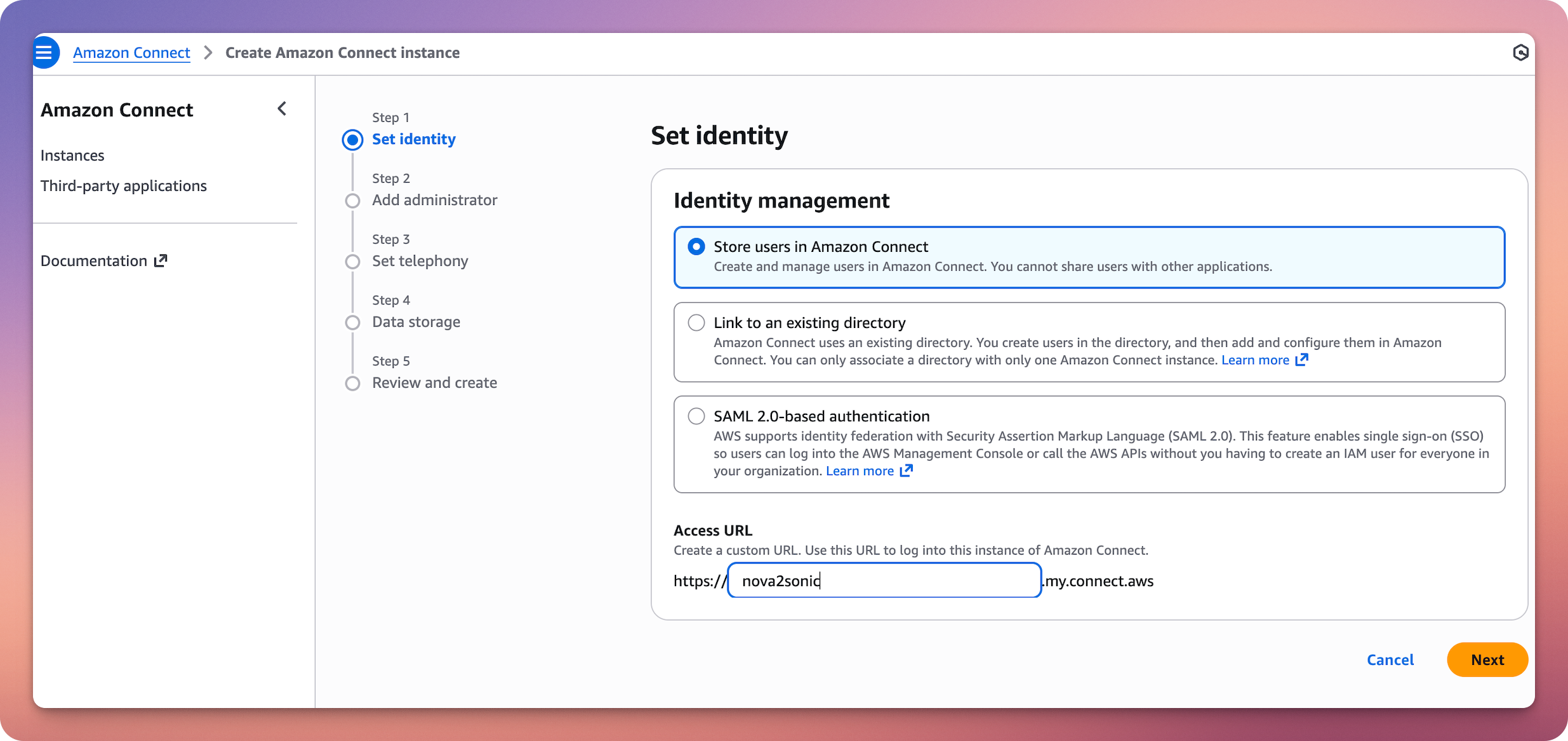
Go to the Amazon Connect Console and create a new instance. Choose “Store users within Amazon Connect” for identity management. Give your instance an alias. Configure your admin user. Enable both telephony options: receive inbound calls and make outbound calls. Accept defaults for data storage. The instance takes a few minutes to provision.
Claim a Phone Number
Inside your Connect instance, go to Channels and communications, then Phone numbers. Click “Claim a phone number.” Select your country and pick an available number. Save it.
Set Up the Connect Assistant and AI Agent
Navigate to Amazon Q in the left sidebar of your Connect admin console. Enable Amazon Q in Connect if prompted. This creates the underlying assistant infrastructure.
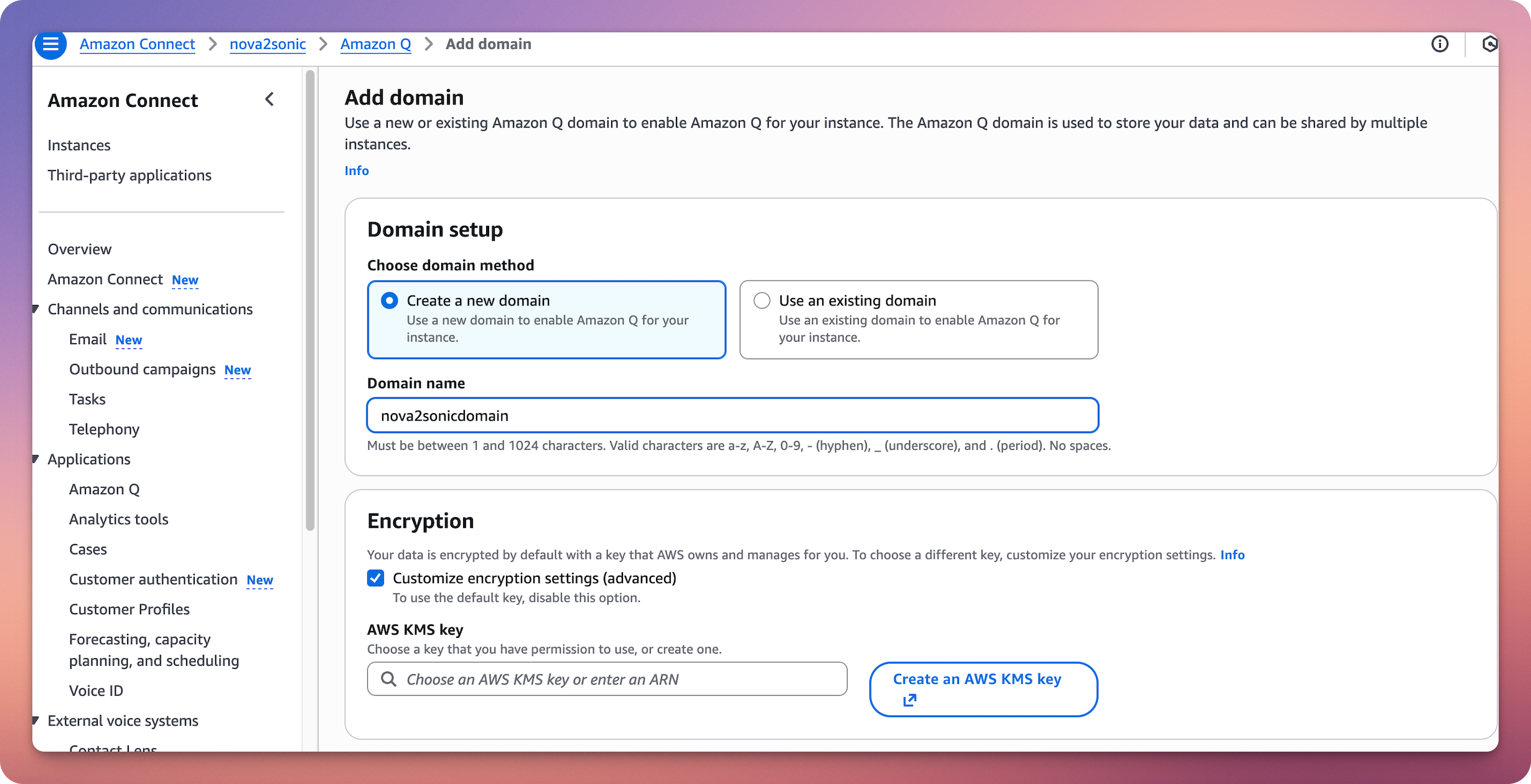
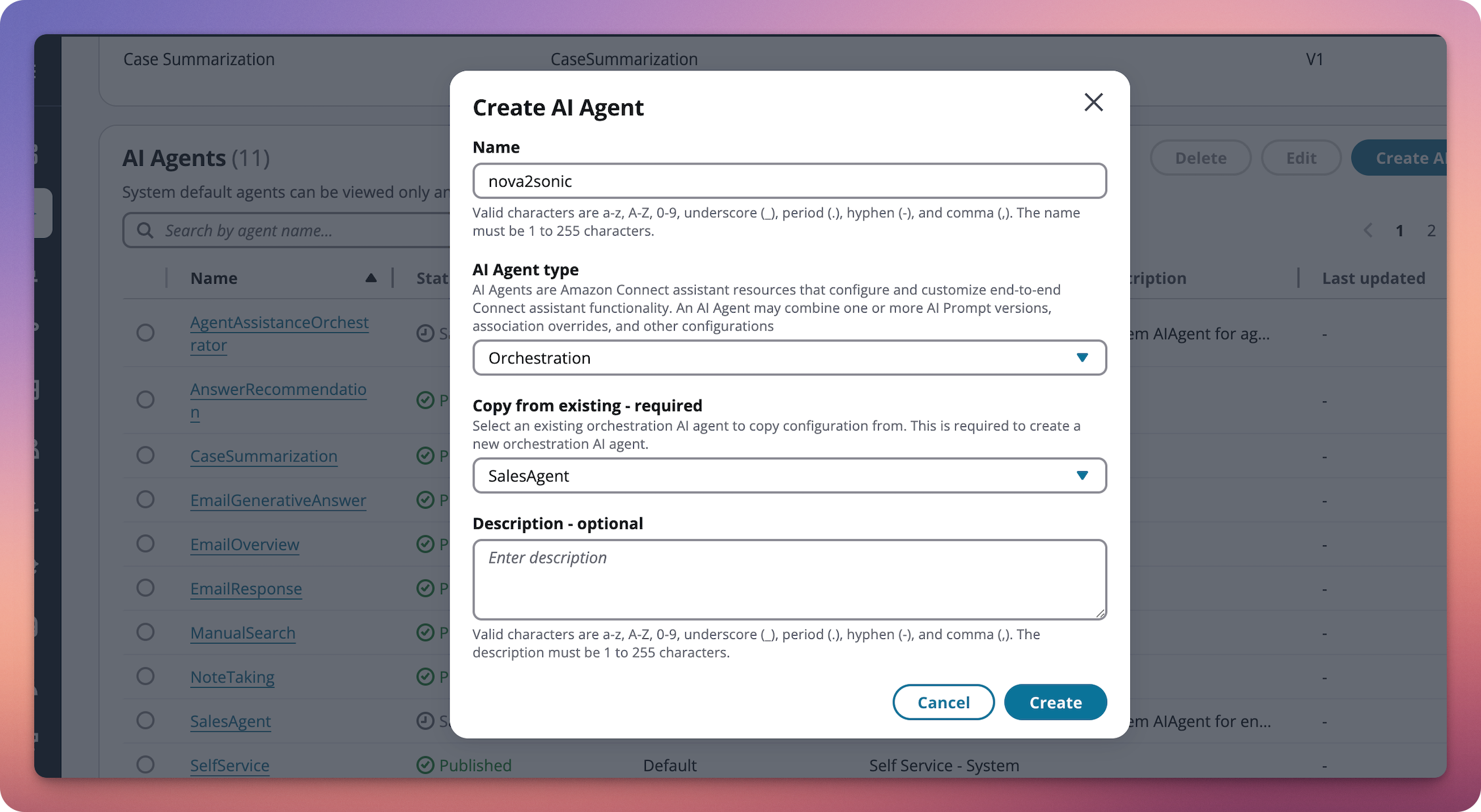
Go to Amazon Q, then AI Agents. Click “Create AI Agent.” Choose “Self-service” as the agent type.
In the bot configuration, go to the Configuration tab. Select your locale. Under Speech model, click Edit. Set Model type to “Speech-to-Speech.” Select Amazon Nova Sonic as the voice provider.
Your AI Agent is now powered by Nova Sonic for speech-to-speech interactions.
Create the Contact Flow
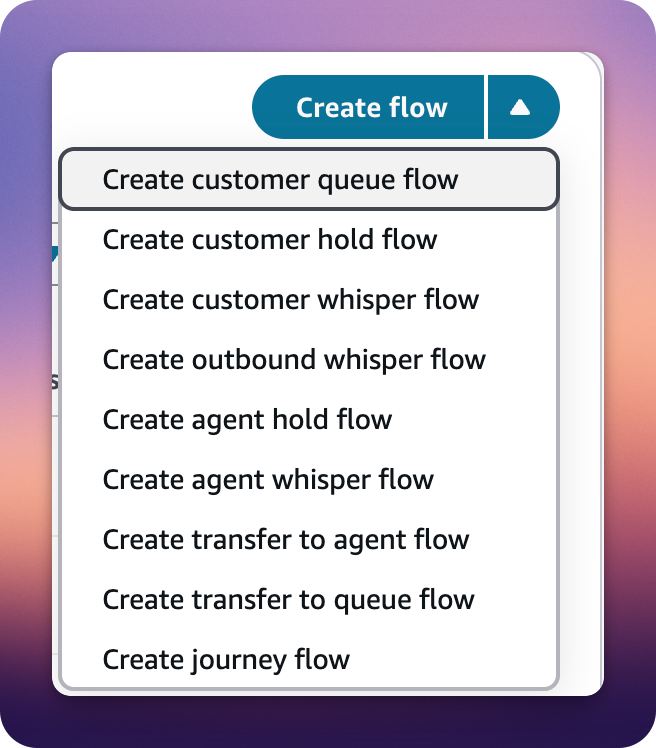
In Amazon Connect, go to Routing, then Contact flows. Click “Create flow” (the main button, not the dropdown). This creates a standard inbound flow, which confusingly works for both inbound and outbound calls. Name it something like “Nova Sonic Voice Agent.”
Build the Flow
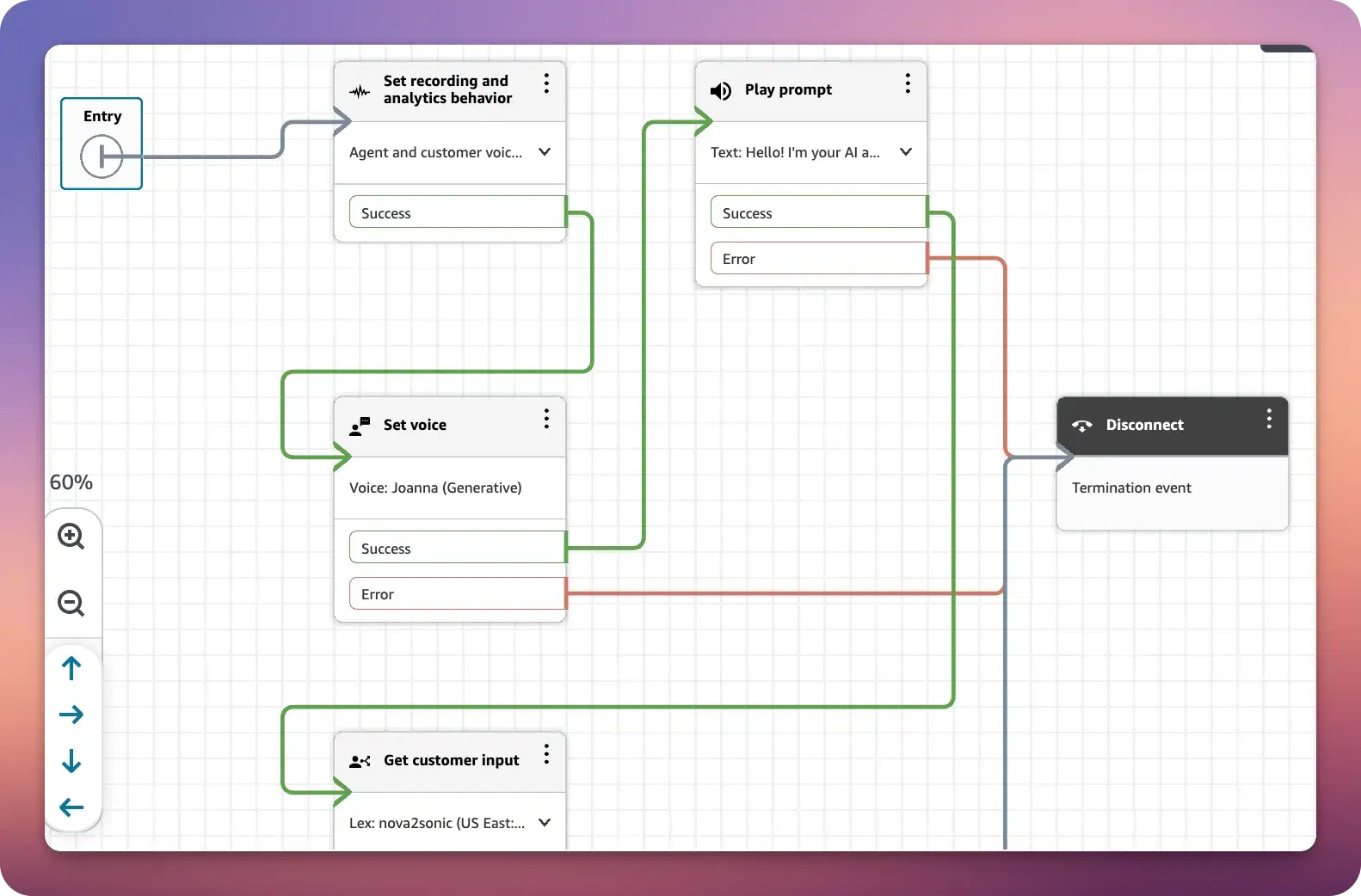
In the flow designer, add these blocks in order:
Block 1: Set voice
Find it in the Set category. Configure voice provider as Amazon, language as English US (or your language), and voice as Matthew, Amy, Olivia, or Lupe (Nova Sonic compatible voices). Expand “Other settings,” then “Override speaking style,” and select “Generative.”
Block 2: Play prompt
Find it in the Interact category. Set prompt type to “Text-to-speech.” Enter text: “Hello! I’m your AI assistant. How can I help you today?”
Block 3: Get customer input
Find it in the Interact category. This is the critical block. Select the Amazon Lex tab. Choose your Nova Sonic bot from the dropdown. Select the alias. Under Intents, click “Add an intent” and add FallbackIntent.
At the bottom, toggle ON “Enable AI Agent.” This is what activates the Nova Sonic conversational AI.
Block 4: Disconnect
Find it in the Terminate/End category.
Wire the Blocks
Connect them in this order: Entry point → Set voice → Play prompt → Get customer input → Disconnect.
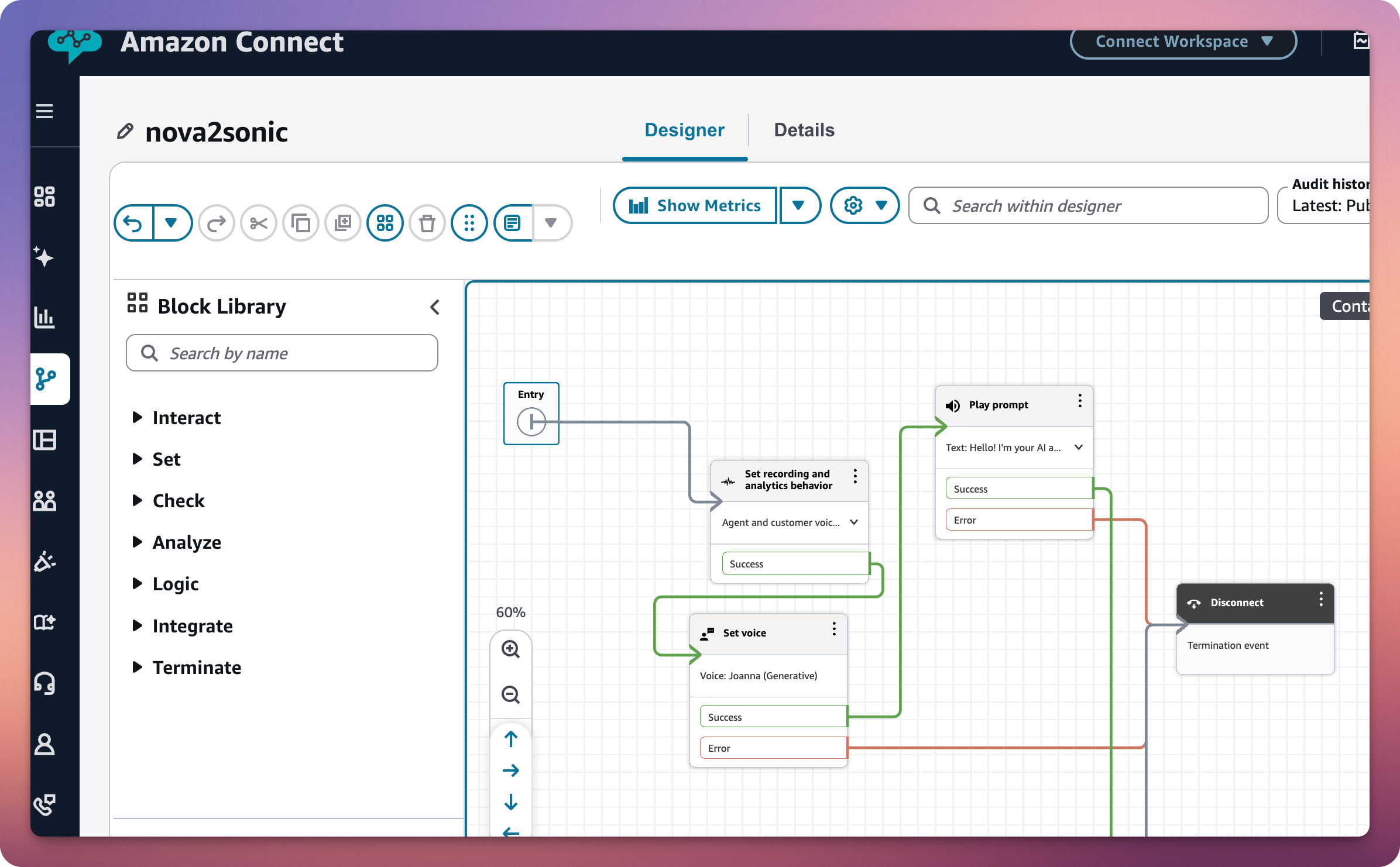
Make sure all outputs from “Get customer input” (intents, error, timeout) connect somewhere, either to a loop or to Disconnect. An unconnected output prevents the flow from saving.
Save and Publish
Click Save in the top right, then Publish. Your flow is now live.
Associate the Flow with Your Phone Number
Go to Channels and communications, then Phone numbers. Click on your phone number. Under “Contact flow / IVR,” select your “Nova Sonic Voice Agent” flow. Save.
Or via CLI:
# Get Instance ID

aws connect list-instances --region us-east-1 \

  --query “InstanceSummaryList[?InstanceAlias==’nova2sonic’].Id” --output text

# Get Flow ID

aws connect list-contact-flows \

  --instance-id YOUR_INSTANCE_ID \

  --region us-east-1 \

  --query “ContactFlowSummaryList[*].[Name,Id]” --output table

# Get Phone Number ID

aws connect list-phone-numbers-v2 --region us-east-1 \

  --query “ListPhoneNumbersSummaryList[*].[PhoneNumber,PhoneNumberId]” --output table

# Associate

aws connect associate-phone-number-contact-flow \

  --phone-number-id “YOUR_PHONE_NUMBER_ID” \

  --instance-id “YOUR_INSTANCE_ID” \

  --contact-flow-id “YOUR_FLOW_ID” \

  --region us-east-1
Test It
Pick up your phone and dial your Connect number. You should hear the greeting, then be able to speak naturally to Nova Sonic and get real-time voice responses powered by the speech-to-speech model.
If the call drops after the greeting, double-check that “Enable AI Agent” is toggled on in the “Get customer input” block. This was the gotcha that caught me.
Making Outbound Calls
Want the AI to call you instead? Use the StartOutboundVoiceContact API:
aws connect start-outbound-voice-contact \

  --instance-id “YOUR_INSTANCE_ID” \

  --contact-flow-id “YOUR_FLOW_ID” \

  --destination-phone-number “+1YOURPHONENUMBER” \

  --source-phone-number “+1CONNECTNUMBER” \

  --region us-east-1
International calling requires country-by-country approval. If you get a DestinationNotAllowedException, submit an AWS Support request to enable outbound calling to that country. The support request is straightforward: specify the country code and your instance ID.
What You Built
At this point, you have a working voice AI agent powered by Nova Sonic that accepts inbound calls to your Connect phone number, greets callers with a natural voice, understands spoken input in real-time via speech-to-speech processing, and responds conversationally without the latency of traditional STT→LLM→TTS pipelines.
The “Enable AI Agent” toggle in the Get customer input block is doing the heavy lifting. It connects your Lex bot configuration to the Nova Sonic speech-to-speech model under the hood.
Know the Pieces to Find Better Fits
This is not meant to be a complete Amazon Connect tutorial. There’s far more to that tool than we can cover in one post. The takeaway is that new services launch constantly. You need to see if they apply to your use case.
Only by knowing how the pieces work and what each of them does can you find replacements and optimize.
In future posts we can cover adding tool calling so the agent can execute actions during conversations, connecting retrieval with Knowledge Bases to ground responses in your documentation, setting up observability so this is not a black box, and hardening for production with error handling and fallbacks.
For now, make that call. There’s something genuinely different about having a conversation with an AI over the phone. The medium makes it feel more real than any chatbot ever could.